
Challenge
Client-facing technical teams needed AI-powered decision support during live meetings, not after them. Existing alternatives forced a tradeoff: either manually query a chatbot mid-conversation (high cognitive load, broken context) or rely on post-meeting transcription (useful for records, useless for in-meeting decisions).
Solution
Yodo Labs designed and delivered a real-time meeting copilot: an ambient system that captures audio at the OS level, detects questions as they are asked, and proactively surfaces relevant context from internal documents, all without requiring any user interaction during the meeting.
Results
- Context surfaced within approximately one second of a question being completed
- Zero in-meeting interaction required, fully ambient operation
- Works across Zoom, Teams, Google Meet, and phone calls using the same copilot stack; extends to in-person meetings when room audio is routed through the device
- Session-scoped cloud processing with no third-party data retention
- Reduced post-meeting follow-ups: questions answered in real time rather than deferred
Client Background
The client is a technology consulting firm whose teams regularly engage in complex, client-facing technical discussions. Solution architects and technical leads routinely field detailed questions spanning product specifications, system architecture, and implementation constraints, often across multiple languages in cross-border engagements.
Challenge
In high-stakes technical meetings, conversations move fast. When a client asks an unexpected question, the consultant has seconds to respond with accurate, grounded information. Pausing to look something up breaks the flow; answering vaguely erodes trust.
The client's teams had explored two categories of workarounds, and found both inadequate:
Real-time, but high cognitive load: Some team members kept ChatGPT or similar tools open during meetings, manually typing queries as questions arose. This approach demanded simultaneous listening, summarizing, and typing, a cognitive burden that degraded both the quality of the AI query (missing conversational context) and the consultant's presence in the meeting itself.
Low effort, but not real-time: Others relied on meeting recordings and post-session transcription. While useful for documentation and review, these tools provided no support at the moment a question was asked, precisely when it was needed most. Information was preserved, but in-meeting decision velocity did not improve.
Built-in AI features from meeting platforms (Zoom AI Companion, Google Gemini in Meet) offered post-meeting summaries and action items, but did not address the core requirement: real-time decision support during the conversation. Additionally, the client's teams used a mix of communication tools depending on the engagement (Zoom, Microsoft Teams, Google Meet, phone calls, and occasionally in-person meetings), making any single platform's AI feature insufficient as a universal solution.
Yodo Labs' Solution
Yodo Labs built a three-layer real-time meeting copilot designed around a streaming architecture where every component operates on continuous data flows rather than request-response cycles.
Architecture Overview
The system consists of three layers, each purpose-built for its role in the real-time pipeline:
- A native desktop companion application for OS-level audio capture
- A streaming relay service for real-time speech-to-text and question detection
- A web-based copilot interface for ambient display of transcription, detected questions, and AI-generated context
The Real-Time Streaming Pipeline
The core engineering challenge was latency. For a copilot to be useful during a live conversation, the time from question completion to a contextual suggestion appearing on screen must be approximately one second. This rules out conventional request-response architectures and requires streaming at every layer.
1) OS-Level Audio Capture (Desktop Companion)
The companion application captures system audio at the operating system level using platform-native audio APIs [1], streaming audio frames over a local WebSocket connection to the copilot client. Because it captures the audio output of the system rather than hooking into any specific application, the same copilot stack works across video calls on any platform and phone calls routed through the device, without integration into any specific communication tool. For in-person meetings, the same pipeline applies when room audio is captured through a microphone input or conference-room AV routed into the device.
The copilot client encodes and transmits audio to the cloud relay service for transcription. Audio is processed transiently in streaming sessions; no audio data is persisted by any third-party service beyond the duration of the session.
2) Streaming Relay Service: Speech-to-Text and Question Detection
The relay service receives audio chunks and forwards them to a cloud speech-to-text engine in a continuous streaming session [2]. Rather than waiting for complete utterances, the service processes interim results as they arrive, enabling the frontend to display transcription word-by-word in real time.
For sessions involving multiple languages, users configure an expected language set at session start. The relay service uses this configuration to select the appropriate regional endpoint and STT model variant upfront, balancing transcription accuracy, language coverage, and latency. Within the session, the cloud STT engine provides automatic language detection across the configured language set [2].
The relay also runs the component that distinguishes this system from a transcription tool: ambient question detection. A dedicated detection pipeline operates on the streaming transcript output, identifying questions as they resolve in the transcript, not after the meeting, and not when the user manually flags them.
The detection logic handles linguistic diversity: question marks across scripts, interrogative sentence patterns in Latin-alphabet languages, and question-final particles in CJK languages (e.g., Japanese か, Chinese 吗/呢). A configurable accumulation buffer and minimum-length threshold filter out false positives from partial transcripts and filler speech.
When a question is detected, the system immediately triggers a retrieval step against the user's pre-uploaded reference documents (product specifications, architecture diagrams, proposal decks, prior meeting notes) and generates a contextual suggestion using a foundation model API. The response streams back to the copilot interface and appears alongside the detected question, typically within approximately one second of the question being completed.
3) Copilot Interface
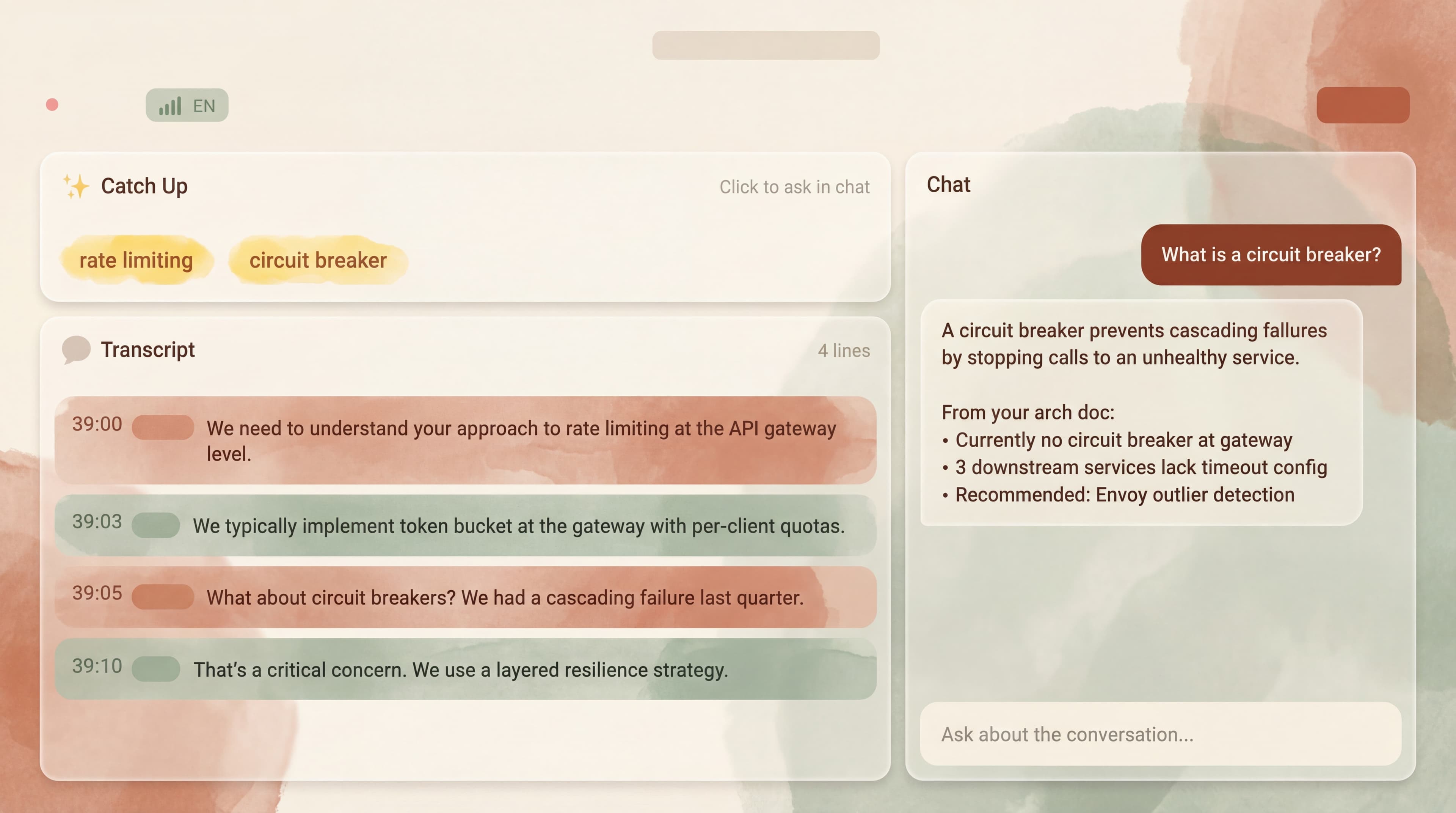
The web-based interface is designed for ambient, peripheral use, visible on a secondary monitor or a portion of the screen, requiring no interaction during the meeting. It displays three synchronized panels:
- A live transcript with word-by-word rendering
- A question panel showing detected questions with suggested context and keywords
- A chat panel for optional deeper exploration after the meeting or during breaks
All panels update via streaming connections. The interface is deliberately minimal: during a meeting, the user's attention should remain on the conversation, not on the tool.
Data Handling and Session Lifecycle
The system was designed to satisfy the client's internal security review. Audio is captured locally on the user's device and streamed transiently to the cloud STT service for real-time transcription. No audio or transcript data is persisted by third-party services beyond the active streaming session. Document retrieval operates on pre-indexed content stored within the client's infrastructure. Session recordings and transcripts are retained only within the client's own environment, under their existing data governance policies.
Results
The copilot was delivered as a proof of concept to the client's solution architecture and technical consulting teams:
- Real-time decision support: Questions detected and contextual suggestions surfaced within approximately one second of question completion, enabling consultants to respond with grounded information during the conversation rather than deferring to follow-up emails.
- Zero operational overhead: The ambient, hands-free design meant no change to how teams conducted meetings. No new buttons to press, no switching to a chat window, no post-meeting processing steps.
- Cross-platform coverage: OS-level audio capture eliminated dependency on any single communication platform, covering remote meetings across tools and extending to in-person settings when room audio was routed through the device.
- Data governance: Session-scoped cloud processing with no third-party data retention cleared the client's internal security and data governance review.
- Foundation for expansion: The modular streaming architecture provided a basis for extending the copilot to additional teams and adjacent use cases (e.g., real-time interpretation for cross-border meetings) without redesigning the core pipeline.
Why a Pipeline Architecture Over End-to-End Speech-to-Speech
Before settling on the STT-to-text-LLM pipeline described above, Yodo Labs evaluated end-to-end speech-to-speech models as potential alternatives. These included commercial offerings such as the OpenAI Realtime API [3], as well as open-source models including Moshi [4] (Kyutai), GLM-4-Voice [5] (Zhipu AI), and Llama-Omni [6].
End-to-end speech-to-speech models offer a latency advantage by eliminating intermediate transcription and text-generation steps, and some commercial implementations now support function calling and external tool integration [3]. However, in our evaluation for this use case, the pipeline architecture provided better control over retrieval quality, intermediate processing (such as question detection on the transcript stream), and structured output generation. A pipeline, where a dedicated speech-to-text engine feeds a text-based language model, also made it straightforward to independently upgrade or swap individual components as better models became available. This evaluation directly informed the architecture choice for the delivered system.
As speech-to-speech architectures continue to mature, particularly in reasoning depth and multilingual support, a future iteration of this system could adopt a more integrated approach. The current architecture was designed with this transition in mind: the streaming interfaces between layers are abstracted such that replacing the STT-to-text-LLM pipeline with an end-to-end model would require changes to the relay service, but not to the audio capture or frontend layers.
References
- Apple ScreenCaptureKit, Audio capture documentation. developer.apple.com/documentation/screencapturekit
- Google Cloud Speech-to-Text V2, Streaming recognition. cloud.google.com/speech-to-text/v2/docs
- OpenAI Realtime API. platform.openai.com/docs/guides/realtime
- Défossez, A. et al., Moshi: a speech-text foundation model for real-time dialogue. Kyutai. github.com/kyutai-labs/moshi
- GLM-4-Voice, End-to-end voice model. Zhipu AI. github.com/THUDM/GLM-4-Voice
- Fang, Q. et al., LLaMA-Omni: Seamless Speech Interaction with Large Language Models. github.com/ictnlp/LLaMA-Omni